Build a Family Image Classifier With Google Teachable Machine
This project starts with a simple idea: let the child build an AI model that learns to sort webcam images into categories.
What matters today
This project starts with a simple idea: let the child build an AI model that learns to sort webcam images into categories.
This project starts with a simple idea: let the child build an AI model that learns to sort webcam images into categories.
Google Teachable Machine is the right tool because it lets kids train image, sound, and pose models without writing code. For this activity, use an image project. The child will choose a few safe household categories, collect examples, train the model, and test what it gets wrong.
Start here: https://teachablemachine.withgoogle.com/
What the kid is building
The child is building a supervised image classifier. You do not need to teach that phrase first. Just say:
"We are going to teach the computer three categories by showing it examples. Then we will test whether it learned the pattern or just memorized the room."
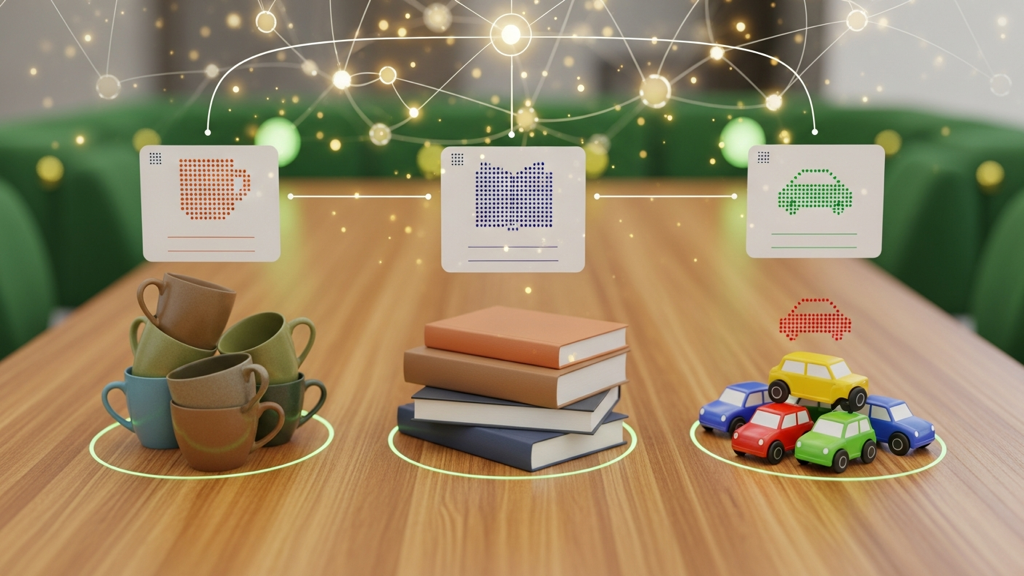
Good first categories:
- Mug.
- Book.
- Toy car.
You can swap in other safe household objects, but keep the classes visually different for the first run. A mug, a book, and a toy car are easier than three similar toys.
Materials
You need:
- A computer with a webcam.
- Three safe household object categories.
- 20 to 30 examples per category.
- A simple scorecard on paper.
- A parent nearby for setup and privacy.
Do not use faces, names, school uniforms, addresses, or personal documents in the training examples.
Build the classifier
- Open Google Teachable Machine.
- Choose Image Project.
- Create three classes.
- Name them with the object categories.
- Use the webcam or uploaded images to collect 20 to 30 examples per class.
- Train the model.
- Test it with new objects, new angles, different lighting, and different backgrounds.
The first model will not be perfect. That is the point.
Make the first test playful
After training, ask the child to become the model detective. The job is not to celebrate every correct answer. The job is to figure out what the model actually learned.
Try three rounds.
Round one is easy mode. Test the same kinds of objects in the same place where the model was trained. This shows whether the basic setup worked.
Round two changes one thing. Move the object, change the angle, or change the background. This shows whether the model learned the object or the training scene.
Round three uses a new example. Try a different mug, a different book, or a different toy car. This shows whether the model can generalize beyond the exact examples it saw.
Kids usually understand the lesson quickly when the model makes a funny mistake. If the model calls a toy car a mug because both were photographed on the same table, that is not failure. That is the teachable moment.
Run the experiment
After the first test, ask the child to predict what will happen if you change one thing.
Try:
- Move the mug farther away.
- Put the book on a patterned blanket.
- Hold the toy car upside down.
- Turn off one light.
- Add a new mug that was not in the training examples.
Keep score:
Test item: What changed: Model guess: Was it right? Why do we think it got confused? What example should we add next?
What kids learn
This project makes AI concrete. Kids see that:
- Labels matter.
- Examples matter.
- Backgrounds can fool the model.
- Testing is different from training.
- Confidence is not the same as being correct.
- More examples can improve a model, but only if they are good examples.
That last lesson is the big one. The model is not magic. It is shaped by the data you give it.
Improve the model
Once the child finds a mistake, improve the dataset instead of just retraining blindly.
Ask:
- Do we need more examples?
- Do we need different backgrounds?
- Do we need different lighting?
- Did one class get clearer examples than another?
- Are two categories too similar?
Then add a second batch of examples. Keep the categories the same, but make the examples more varied. Add different angles. Move the objects closer and farther away. Change the surface underneath them. Use a second mug or a second book if you have one.
Train again and compare the scorecard. The point is not "more data is always better." The point is "better examples make better models."
Parent questions
Ask these after the test:
- Which class was easiest for the model?
- Which class was hardest?
- Did lighting change the result?
- Did the background matter?
- What examples would make the model better?
- How would we know if the model is ready to use?
Parent sidebar
Keep the project safe and local. Do not train on faces, addresses, school names, documents, or anything personal. Household objects are enough.
The best parent role is to ask questions, not take over the mouse. Let the child choose the categories, collect examples, and make predictions. Step in for privacy, setup, and troubleshooting.
Use plain language:
- "Training examples are what we teach the model with."
- "Testing examples are what we use to see if it really learned."
- "Confidence means how sure the model is, not whether it is correct."
- "A mistake tells us what to improve next."
Those four ideas are real AI literacy in kid-friendly language.
Action steps
- Build a three-class image project in Google Teachable Machine.
- Collect 20 to 30 safe examples per class, then test with examples the model has never seen.
- Have the child improve the dataset and explain why the second model worked better or worse.
Three deep dives. Four useful moves. One email worth opening.
PromptHacker turns the AI firehose into practical next steps for work, health, family, and everything time keeps trying to steal.