Perplexity Computer Branching Research Workflow
Perplexity's June 19, 2026 Computer update made research less linear. Deep Research now works inside Computer, the command panel is faster, and forking lets you branch a useful thread without losing the original.
What matters today
Perplexity's June 19, 2026 Computer update made research less linear. Deep Research now works inside Computer, the command panel is faster, and forking lets you branch a useful thread without losing the original.
Perplexity's June 19, 2026 Computer update made research less linear. Deep Research now works inside Computer, the command panel is faster, and forking lets you branch a useful thread without losing the original.
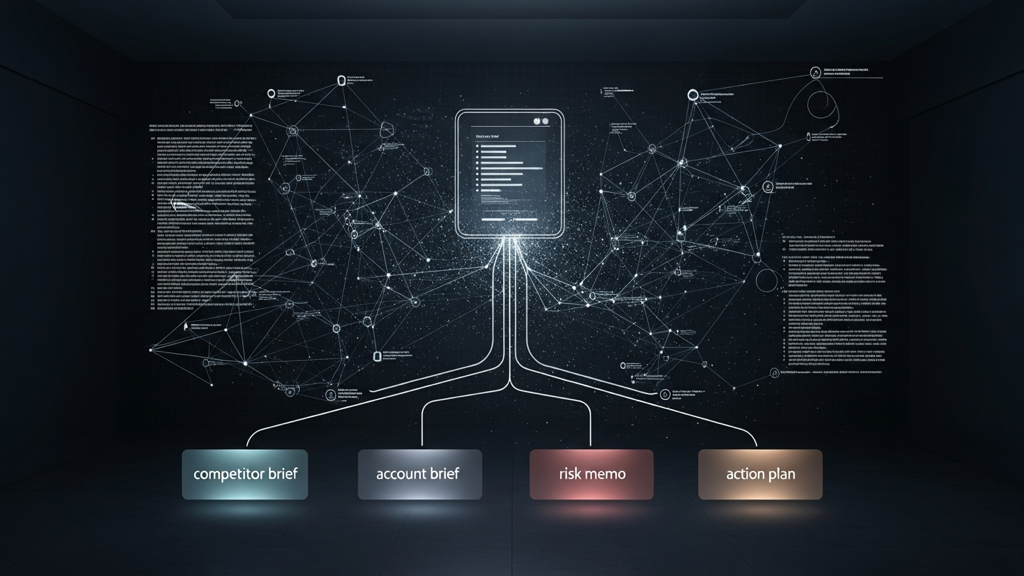
That matters because most research work is not one question and one answer. One market scan can become a competitor brief, an account plan, a risk memo, and a next-action list. If you keep all of that in one chat, the thread becomes muddy. If you branch it, each output can grow in its own direction while the original source trail stays intact.
Start with one base brief
Do not begin by asking for four separate deliverables. Start with one source-rich base.
Use this:
Research [MARKET, ACCOUNT, OR COMPETITOR]. Create a base brief that supports this decision: [DECISION]. Focus on changes in the last 30 days, competitor moves, buyer concerns, pricing signals, regulatory or platform risk, and three opportunities we could act on this month. Include sources for the claims that would matter in a business decision.
The decision line is the key. Research without a decision becomes trivia. Research with a decision becomes material.
Fork into four branches
Once the base brief is useful, fork it into specialized branches.
Branch 1: Competitor read
Turn this base brief into a competitor read. Focus on positioning, recent moves, pricing signals, channel strategy, and what our team should watch next.
Branch 2: Account or customer read
Turn this base brief into an account planning memo. Focus on likely buyer priorities, objections, timing, stakeholders, and three ways to open a useful conversation.
Branch 3: Risk memo
Turn this base brief into a risk memo. Separate known risks, inferred risks, weak signals, and questions that need a human follow-up. End with the top three things that could make this decision wrong.
Branch 4: Next-action list
Turn this base brief into a one-week action plan. Include tasks, owners, dependencies, and the first message or artifact each owner should produce.
Why forking changes the work
Without forking, a research session becomes a long mixed-purpose thread. The model starts blending research, planning, copy, and task management. That is where the output gets harder to review.
Forking keeps the starting evidence stable while allowing each branch to become a different artifact. Sales gets an account read. Marketing gets message gaps. Product gets roadmap pressure. Leadership gets the risk memo. Everyone is working from the same base, but nobody is stuck with the same format.
Assign a job to each branch
The branch should not be "more research." It should have a job. Give each branch an owner, format, and decision.
Use this branch plan:
- Competitor read: owner is marketing or strategy, format is a short memo, decision is where to adjust positioning.
- Account read: owner is sales, format is a call-prep brief, decision is how to open the next conversation.
- Risk memo: owner is leadership or operations, format is a one-page risk table, decision is what needs review before action.
- Action plan: owner is the person driving the project, format is a task list, decision is what gets done this week.
That structure prevents research sprawl. It also gives each reader a reason to care. The competitor branch should not read like the risk branch. The action branch should not include ten pages of background. Each branch earns its place by creating a different kind of useful artifact.
Keep the base brief clean
The base brief is the source layer. Keep it neutral, cited, and broad enough to support the branches. Avoid asking it to recommend the final action too early. Once the model starts optimizing for a conclusion, it can quietly shape the research around that answer.
Instead, make the base brief answer three questions:
- What changed recently?
- Which claims are supported by sources?
- Which uncertainties matter to the decision?
Then let the branches interpret the evidence for different audiences. This is the difference between research as a pile of facts and research as an operating system for decisions.
Add a source audit
Before exporting the strongest branch, run:
Audit this branch for source quality. Separate claims supported by strong sources, claims supported by weak or indirect sources, and claims that are inference. Remove or soften anything that should not be treated as fact.
This is where the workflow becomes executive-ready. The export should not just look clean. It should show which claims can carry weight.
Export rules
Only export the branch that has a clear next user. If nobody is going to use the competitor read, do not polish it. If the account read is the useful artifact, export that and leave the rest as working notes.
Before sending, add a short header:
- Decision supported.
- Sources reviewed.
- Confidence level.
- Open questions.
- Recommended next action.
That header makes the research easier to trust and easier to challenge.
Action steps
- Start with one base brief tied to a decision.
- Fork the thread into competitor, customer, risk, and action branches.
- Export only the strongest branch after running the source audit.
Three deep dives. Four useful moves. One email worth opening.
PromptHacker turns the AI firehose into practical next steps for work, health, family, and everything time keeps trying to steal.